The Sunday night slump at a library—whether you’re tucked away in a corner of Sheffield’s Diamond or a quiet cafe—is a universal student experience. You have a mountain of PDFs, a looming deadline, and an iPad that currently feels more like a distraction machine than a degree-saving tool.
Transitioning an iPad from a Netflix-binging tablet into a high-output workstation isn’t about the hardware alone. It’s about the ritual. It’s the specific combination of a versatile physical setup, a streamlined digital workflow, and the right frequency hitting your eardrums.
The Bridge Between Tablet and Tool
Most students treat their iPad like a giant phone. They prop it up against a coffee cup, attempt to type on the glass, and quit after twenty minutes of neck strain and typos. According to Apple Education, the magic of the iPad lies in its transition from a consumption device to a creation engine. But to get there, you need a physical anchor.
This is where the ESR Shift Keyboard Case changes the narrative. Unlike the rigid, laptop-mimicking cases that lock you into one position, the Shift is modular. It’s built for the “fluid” student life. If you’re drafting an essay, the magnetic stand keeps the screen at eye level—saving you from the dreaded “library hunch.” If you’re sketching out a mind map with the Apple Pencil Pro or ESR digital pencil, you can detach the keyboard and drop the stand to a 20° “Artist Mode.”
The ability to “shift” angles—from 20° to 75°—means the hardware finally catches up to the software. You aren’t forcing your body to fit the computer; the computer is finally moving with you.
Mastering the “Single-Screen” Workflow
Once the physical setup is dialed in, the digital friction needs to disappear. The Sweet Setup often highlights that the iPad’s greatest strength is its focus. It’s a single-tasking beast if you use it correctly.
Using the ESR Shift’s multi-touch trackpad, you can navigate iPadOS without constantly reaching out to smudge the screen (a phenomenon tech journalists call “Gorilla Arm”). For a serious study session, Split View is your best friend. Throw your research PDF on the left and your Notes app or Notion on the right.
With the keyboard attached, you aren’t just “tapping”; you’re producing. The tactile feedback of the keys allows for that “flow state” where the thoughts move from your brain to the screen without the lag of a virtual keyboard. It’s about creating a compact, focused workspace that fits on a tiny library desk or a folding tray table on a train.
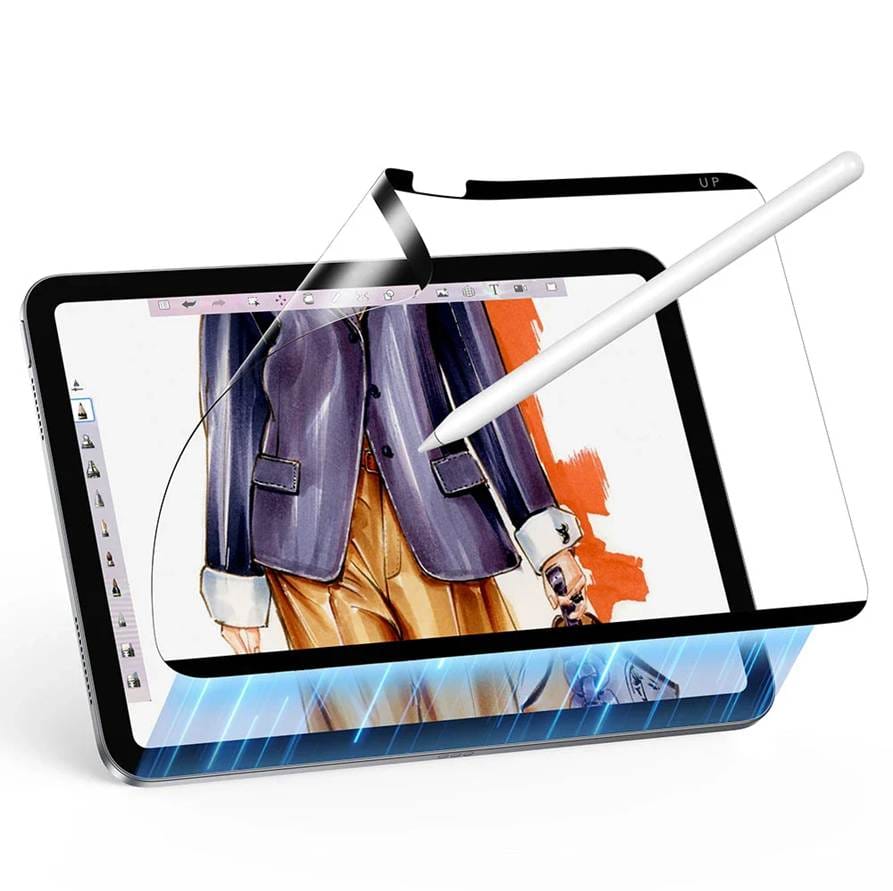
However, all that productivity happens on a piece of glass that is remarkably expensive to replace. Don’t forget to put a screen protector on your precious iPad, especially if you just bought the new iPad Air M4. There is a specific kind of heartbreak that comes from seeing a hairline scratch on a brand-new Liquid Retina display after a long night in the library.
Whether you opt for the Armorite™ tempered glass to survive accidental drops from a library desk, or a Paper-Feel protector to give your Apple Pencil Pro that satisfies tactile friction, a screen protector is the final piece of the “Focus” puzzle. It allows you to swipe, tap, and sketch with total confidence, knowing your investment is shielded while you’re deep in the “flow state,” where thoughts move from your brain to the screen without the lag of a virtual keyboard.
The Cognitive Anchor: Electronic Beats
Even with the perfect keyboard and a crisp Split View, the mind tends to drift. The ambient noise of a library—the rhythmic tapping of pens or the distant hum of a radiator—can break your concentration. This is where the “headspace” comes in.
Music isn’t just background noise; for students, it’s a cognitive anchor. As recently highlighted in Exposed Magazine’s guide to 10 Electronic Music Artists to Listen to While Studying, certain frequencies are better at keeping the brain on track than others.
When the workload feels heavy, I’ve found that the steady, pulsing energy of Sam Barker works wonders. It provides a “metronome” for your typing. If the stress levels are peaking and you need something more atmospheric, the tracks from Akasha System offer a gentle, rain-like flow that helps you navigate complex readings without feeling overwhelmed. And for those late-night revision marathons? You can’t beat the nostalgic, bright energy of Daft Punk to keep the morale high.
The Click of Productivity
The moment you sit down, snap the iPad into the ESR Shift’s magnetic back, and fire up that electronic playlist, your brain receives a signal: It’s time to work. This isn’t just about protection or typing speed. It’s about building a repeatable system. The iPad Air M4 is a powerhouse, but it’s the ESR Shift that gives it the ergonomics to be a “laptop killer,” and it’s the curated beats from Exposed Magazine that give it a soul.
When you stop fighting your device and start working with it, the 5,000-word dissertation doesn’t look like a mountain anymore. It looks like a series of well-angled, well-soundtracked steps.